Congratulations on receiving an artwork with an Startrail Registry Record(SRR)! This guide will explain how to easily receive SRRs and utilize Startrail PORT.
What is SRR? SRR (Startrail Registry Record) is a digital certificate for artworks. It proves the authenticity of artworks and records ownership.
How to Receive SRRs - Two Options
SRRs can be received using the following two methods:
1. Receive Using Email Address
- Easy: No specialized knowledge or pre-created wallet required
- Recommended: Ideal for those new to digital certificates
2. Receive Using Ethereum Address
- Direct: For those with existing Startrail PORT accounts or wallets like MetaMask
- Advanced: Ideal for those familiar with cryptocurrencies and NFTs
[Receiving by Email] Process Flow
For Those Who Don't Have a Startrail PORT Account Yet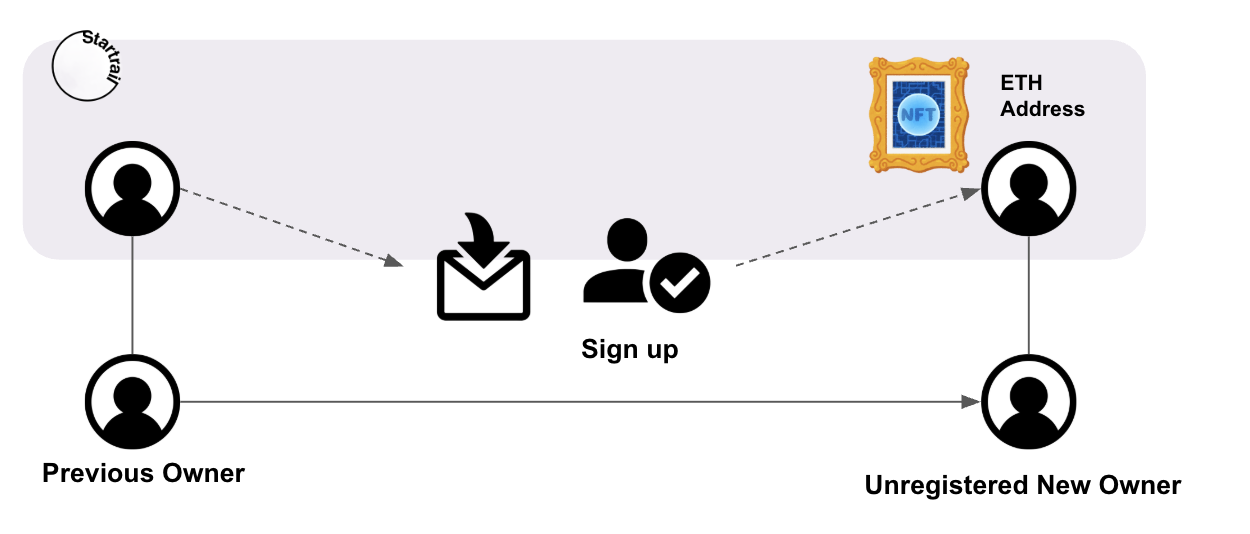
1. Tell the Previous Owner 📝
- Provide your email address to the previous owner
- It's important to provide the address accurately
2. Check Your Email 📧
- When the seller/previous owner processes the SRR transfer, you'll receive an email titled "Request for Account Registration to Receive SRR"
- Click the "View Artwork & Sign UP" button in the email
3. Create Account 👤
- Proceed to the account creation screen from the link in the email
- Register using the email address you provided in step 1 and received the email in step 2
- Create an account by "Continue with email passwordless (Google account is also available if it's a Gmail address)"
4. Receipt Complete ✅
- Once account creation is complete, you'll receive an email stating "SRR ownership has been changed to you"
- This completes the SRR receipt!
👉 How to create a Startrail PORT account: Account Creation Help Page
For Those Who Already Have a Startrail PORT Account
1. Tell the Previous Owner 📝
- Provide your email address or Ethereum address registered when creating your Startrail PORT account to the previous owner
- It's important to provide the address accurately
2. Once the previous owner completes the transfer process, it will be automatically reflected in your dashboard
3. You can confirm it by logging into Startrail PORT and checking the dashboard screen
4. You'll also receive an "SRR Receipt Completion Notice" email
[Receiving by Ethereum Address] Process Flow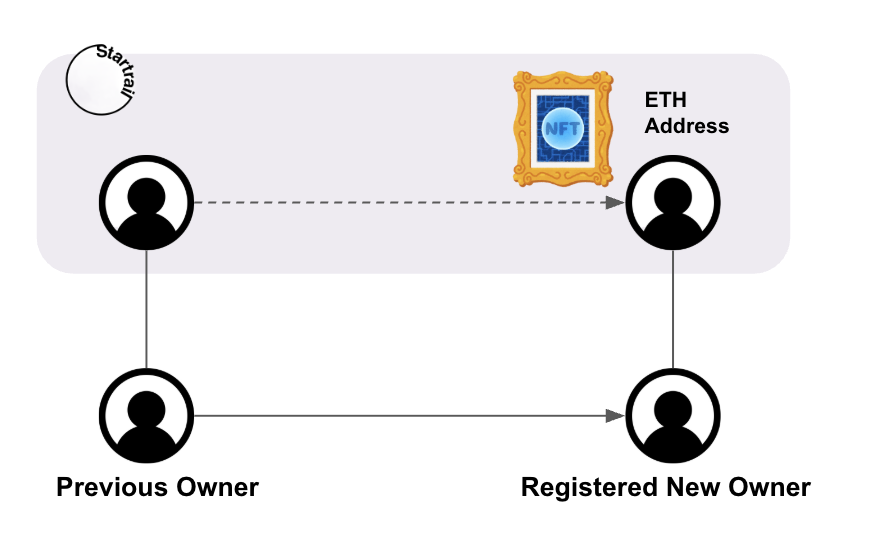
1. Tell the Previous Owner 📝
- Provide your Ethereum address (Startrail PORT account, MetaMask, etc.) to the previous owner
- It's important to provide the address accurately
2. Automatic Reflection ⚡
- Once the previous owner completes the transfer process, the SRR will be automatically added to your wallet
- No special operations are required
👉 How to receive with MetaMask: Account Creation with MetaMask Help Page
Verify Artwork Certificates with NFC Tags
If the artwork has an NFC tag attached, you can easily access the artwork's certificate information using your smartphone.
How to Use NFC Tags
1. Turn on your smartphone's NFC function
- For iPhone: "Settings" → "Control Center" → Add "NFC Tag Reader"
- For Android: "Settings" → "Connections" → Turn on "NFC"
2. Read the tag
- Bring your smartphone close to the NFC tag (usually within 5cm)
3. Check the certificate
- When the tag is read, the SRR Viewer opens and displays the artwork's certificate information
Benefits of NFC Tags
- Proof of Authenticity: You can easily verify that the artwork is genuine
- Check Artwork Information: You can immediately check artwork information
👉 NFC Tag Reading Method Details: NFC Tag Help Page Link
After Receiving Your SRR
The received SRR can be checked on the Startrail PORT dashboard:
What You Can Do on the Dashboard
- Check detailed artwork information
- Display artwork certificates
- Check artwork provenance
- Transfer artworks to third parties (when necessary)
👉 Dashboard Details: Dashboard Help Page Link